
Download Termius – SSH Client, Terminal Emulator, Remote Access
Overview
Termius is a dedicated SSH client designed for secure remote access to servers and network devices. Built as a standalone Chrome app, it functions as a full-featured terminal emulator with no reliance on proxy connections, ensuring direct and reliable communication. The application supports offline operation, allowing users to maintain productivity even without an active internet connection. Data is stored locally by default, preserving privacy and minimizing dependency on external services.
Designed for system administrators, developers, and IT professionals, Termius enables seamless management of remote systems across multiple platforms. Its smart search bar combines a search interface with a command line, offering quick access to saved hosts and connection history. For users with a Premium subscription, Serverauditor integration provides cloud-based login and synchronization across devices, ensuring consistent access to configurations and credentials.
Native applications are available for iOS and Android, supporting cross-platform data synchronization. This makes Termius ideal for professionals who manage servers from various devices throughout the day. The software’s focus on security, offline functionality, and multi-platform compatibility positions it as a practical tool for remote system administration and secure terminal access.
Key Features & Capabilities
- xterm compatibility – Ensures full compatibility with standard terminal environments, enabling seamless execution of shell commands and scripts across diverse server setups.
- Port Forwarding – Allows secure tunneling of network traffic, useful for accessing services behind firewalls or securely connecting to databases and web servers.
- Rapid rendering – Optimized display performance ensures fast response times and smooth text rendering, improving usability during intensive command-line operations.
- Tabs with hot-key support – Multiple terminal sessions can be managed simultaneously using keyboard shortcuts, enhancing workflow efficiency for power users.
- Smart-search window – Combines host lookup and command-line input into a single interface, reducing navigation time and streamlining access to frequently used connections.
- Key and password authorization – Supports both password-based and key-based authentication, offering flexibility and enhanced security for different deployment scenarios.
- Customizable appearance – Features eight built-in color schemes and adjustable font size, allowing users to personalize their terminal experience for improved readability and comfort.
These capabilities make Termius well-suited for daily server management, script execution, and secure remote troubleshooting. The combination of offline functionality and cloud sync (via Premium) ensures that users can work efficiently whether on a local machine or across devices.
User Interface, Workflow & Performance
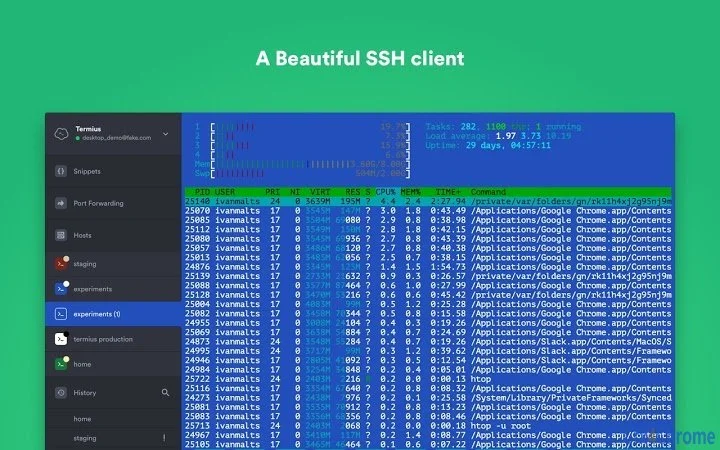
The user interface of Termius is clean and functional, designed with productivity in mind. The main window features a minimalistic layout with a central terminal area, while the smart-search bar serves as both a command line and a host selector. Navigation is intuitive, with easy access to saved connections and session history through a single input field.
Workflow efficiency is enhanced by keyboard-driven controls, including hotkeys for tab switching and command execution. This allows experienced users to operate without relying on mouse interactions, maintaining high-speed workflows. The application’s performance is optimized for responsive terminal behavior, with rapid rendering ensuring that command output appears with minimal delay.
The developer did not specify resource usage details. However, based on general software behavior patterns, Termius is expected to operate efficiently with moderate CPU and RAM consumption, typical for terminal applications. Stability is maintained through local data storage and offline operation, reducing dependency on external services. The application maintains consistent performance across sessions, supporting long-running terminal sessions without noticeable degradation.
Compatibility & System Requirements
Termius is available for Windows, Mac, Linux, Android, iOS, and Chrome OS, making it a versatile choice for users across multiple environments. The software is distributed as a standalone Chrome app, compatible with systems that support Chrome Apps, including older and newer versions of the operating systems listed.
The installation size is 24.5 MB, indicating a lightweight footprint that does not impose significant storage demands. The developer did not specify exact system requirements, such as minimum RAM, processor speed, or disk space beyond the installation size. Compatibility information was partially provided, with support confirmed for the listed platforms.
Users should ensure their system meets the baseline requirements for running Chrome Apps. For systems where Chrome Apps are no longer supported, alternative versions may be available through the official website. The application’s design allows for broad compatibility, particularly in enterprise and development environments where cross-platform tools are essential.
Pros and Cons
Pros
- Lightweight installation at just 24.5 MB
- Supports offline operation for uninterrupted access
- Multiple platforms with cross-device synchronization (Premium)
- Intuitive smart-search interface for fast host access
- Robust SSH functionality with port forwarding and key authentication
- Customizable appearance with multiple color schemes and font options
Cons
- Cloud sync and advanced features require a Premium subscription
- Platform compatibility limited to Chrome Apps, which may not be supported on all modern systems
- Exact performance and system requirements were not specified
- Local data storage may pose challenges for users needing centralized backups
FAQ Section
Is Termius available for Windows, Mac, and Linux?
Yes, Termius is available for Windows, Mac, and Linux, as well as Android, iOS, and Chrome OS. It functions as a standalone Chrome app across these platforms.
Can I use Termius without an internet connection?
Yes, Termius supports offline mode, allowing you to establish SSH connections and use the terminal without an active internet connection.
Does Termius support cloud synchronization?
Cloud synchronization is available for users with a Premium subscription through the Serverauditor feature, enabling data and configuration sync across devices.
Is Termius safe to use?
Termius stores data locally by default and uses standard SSH encryption protocols. The developer, Crystalnix, has implemented secure authentication methods to protect user credentials and connections.
How often does Termius receive updates?
Updates are released periodically to improve functionality, fix bugs, and enhance security. The frequency depends on development cycles and user feedback.
Final Thoughts + CTA
Termius stands out as a reliable and feature-rich SSH client for professionals who require secure, efficient remote access. Its lightweight design, offline capabilities, and multi-platform support make it a strong contender in the terminal software space. While some advanced features are restricted to Premium users, the free version offers substantial functionality for everyday use.
Developers, system administrators, and IT teams will benefit most from its intuitive interface, customizable settings, and robust connection tools. The integration of smart-search, tabbed sessions, and rapid rendering enhances productivity without compromising security.
Download Termius now







